

Common Automatic Labeling Problems
Published: August 19, 2026
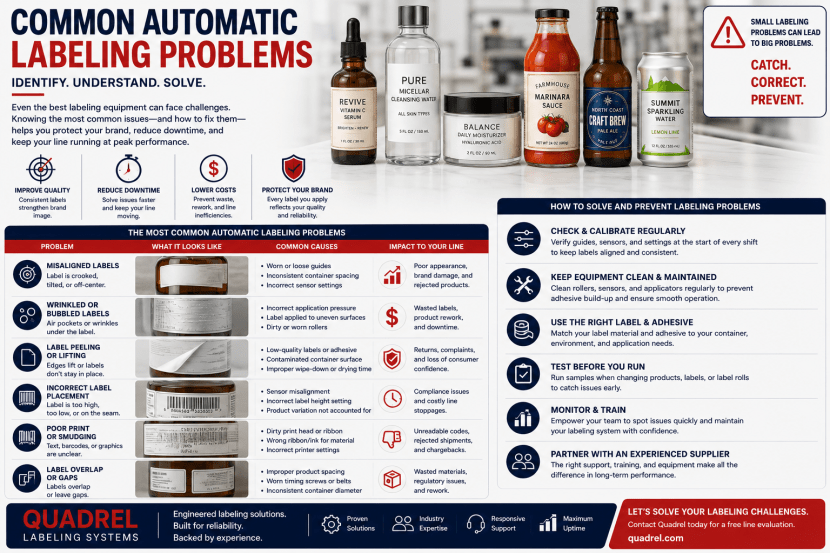
Common automatic labeling problems rarely come from one component alone. Instead, label skew, wrinkles, missed labels, web breaks, poor adhesion, double feeds, drifting registration, and unexpected machine stops usually develop from an interaction between the label material, product handling, sensors, web tension, peel geometry, conveyor movement, and machine settings.
Therefore, effective labeling machine troubleshooting should begin with the complete process rather than one adjustment. For example, a label that applies too late may appear to be a timing problem. However, if the product sensor moved, the conveyor is slipping, or the bottle spacing changed, adjusting the label delay may only hide the real cause.
Likewise, operators may increase wipe pressure when a label starts lifting. Nevertheless, the actual problem may come from condensation, low surface energy, an overly stiff facestock, contaminated packages, or insufficient adhesive tack. Consequently, excessive pressure can create a second problem without fixing the first.
Moreover, many automatic labeling problems begin as minor drift before they become obvious failures. A web may slowly move sideways. A sensor signal may weaken as adhesive or dust collects. A wrap belt may wear gradually. Meanwhile, an operator may compensate with repeated manual adjustments until the machine eventually becomes unstable.
For that reason, this guide organizes common automatic labeling problems by symptom, likely cause, diagnostic sequence, and corrective action. It covers missed labels, double feeds, web breaks, registration drift, crooked labels, wrinkles, bubbles, edge lift, poor adhesion, static electricity, product instability, synchronization errors, coder faults, vision rejects, changeover problems, micro-stoppages, and declining OEE.
Key Takeaways
- Most automatic labeling problems involve several interacting variables rather than one failed component.
- Always confirm product stability before adjusting label timing.
- Web tension that is too high or too low can create tracking, sensing, dispensing, and liner-break problems.
- Label-gap sensors should be recalibrated when label construction changes.
- Peel-plate contamination and incorrect peel geometry can cause poor label release.
- Skew often starts with product movement, web drift, taper, or speed mismatch rather than the label head itself.
- Wrinkles and bubbles should be diagnosed through label material, package shape, wipe geometry, speed, and surface condition together.
- Edge lift can result from poor adhesion, small package diameter, moisture, stiff facestock, contamination, or downstream contact.
- Repeated manual adjustments can hide underlying mechanical or material drift.
- Event logging and trend data can expose recurring micro-stoppages that operators otherwise treat as unrelated incidents.
How Should Automatic Labeling Problems Be Diagnosed?
Where should troubleshooting begin?
The key point: Start with the physical symptom, then verify product movement, label material, web path, sensors, application geometry, and controls before changing software offsets.
First, identify exactly what changed. Determine whether the failure affects every product, one product in twenty, only startup bottles, only high-speed production, or one particular label roll.
Next, determine whether the symptom remains fixed or gradually drifts. A fixed error often suggests setup or geometry. By contrast, gradual drift may indicate wear, tension changes, roll movement, contamination, heat, or product variation.
Additionally, inspect whether the problem follows the machine or the material. For example, if one label roll consistently causes liner breaks while another runs correctly, the material should receive equal attention.
Why should operators avoid changing several settings at once?
The key point: Changing several variables together makes it difficult to identify which adjustment solved or worsened the problem.
Therefore, record the original setting before making a change. Then, adjust one meaningful variable and observe the result across enough products to identify a pattern.
Moreover, operators should distinguish temporary compensation from root-cause correction. Increasing a timing offset may make the next ten packages look better, while the underlying conveyor slippage remains unresolved.
What should be checked before changing machine timing?
The key point: Verify that products reach the trigger and application points consistently before changing dispense delay.
Check the product sensor, conveyor speed, bottle spacing, belt pressure, guide alignment, product slip, and encoder feedback. Afterward, confirm that label-stop position remains stable.
Consequently, timing changes become the final refinement rather than the first reaction.
Why Is the Label Not Dispensing from the Liner?
What causes a label to remain attached at the peel plate?
The key point: Poor release can result from low facestock stiffness, incorrect peel geometry, high release force, excessive adhesive bleed, low web tension, damaged material, or peel-plate contamination.
Thin films are especially sensitive because they can follow the liner around the peel edge instead of continuing toward the product. Therefore, the unsupported distance beyond the peel tip should remain controlled.
Meanwhile, thick or multilayer labels may need more clearance and a different peel condition. Consequently, the same applicator setup may not suit every label construction.
How should poor label release be diagnosed?
The key point: Inspect the peel plate, liner path, label construction, release behavior, web tension, and material condition before increasing drive force.
First, clean the peel edge. Next, confirm that the liner makes the intended sharp turn. Then, check whether the label roll shows adhesive contamination, curling, damaged edges, or inconsistent die cuts.
Additionally, compare the problem with another known-good roll. If the issue disappears, material variation may be the primary cause.
Can an excessively long transfer distance cause the problem?
The key point: Yes. A long unsupported transfer can allow a flexible label to curl downward, flutter, or follow the liner rather than reaching the package consistently.
Therefore, the peel tip should normally sit close enough to the product to maintain label control while still allowing safe package clearance.
Why Is the Labeler Dispensing Two Labels at Once?
What usually causes double feeding?
The key point: Double feeds usually occur when the label-gap sensor misses the gap, sees inconsistent contrast, or uses calibration that does not match the current label construction.
Transparent facestock, metallic decoration, unusual liner material, thick varnish, adhesive contamination, or narrow gaps can change the sensor signal.
Therefore, operators should inspect sensor calibration before changing dispense length aggressively.
Can label-roll quality cause double feeds?
The key point: Yes. Poor matrix stripping, irregular gaps, die-cut defects, and leftover material between labels can prevent reliable gap detection.
Consequently, the label roll itself should be inspected if double feeds begin suddenly after a material change.
What should be checked after recalibrating the sensor?
The key point: Confirm stable web tension and repeatable label stop position because a correct sensor cannot compensate for a web that slips or wanders.
Additionally, inspect whether the sensor remains mechanically secure. Vibration or accidental contact can shift its position and recreate the problem later.
Why Does the Machine Occasionally Miss a Label?
Why are intermittent misses harder to diagnose?
The key point: Intermittent missed labels often come from marginal conditions rather than a complete component failure.
For example, a product sensor may detect nineteen bottles correctly and miss the twentieth because transparency, spacing, vibration, or package position changes slightly.
Likewise, a label-gap sensor may operate near its detection threshold. Therefore, small material variation can produce occasional faults.
Which conditions commonly cause missed applications?
- Inconsistent product spacing
- Marginal product-sensor signal
- Marginal label-gap sensing
- Product tipping or leaning
- Web slippage
- Peel-release hesitation
- Drive overload
- Unexpected conveyor-speed changes
- Incorrect blocked or starved logic
Therefore, event logs and sensor diagnostics can provide more value than observing one normal production cycle.
Why should operators record the exact missed-product pattern?
The key point: Whether misses occur randomly, periodically, at high speed, near roll changes, or during accumulation recovery can reveal the cause.
For example, repeated misses near low roll diameter may suggest unwind or tension changes. Conversely, misses only after startup may indicate acceleration or synchronization problems.
What Causes Unstable Label-Web Tension?
What happens when tension is too low?
The key point: Low web tension can cause liner flutter, slack, poor sensing, lateral wandering, inconsistent label stop position, and delayed response during acceleration.
Therefore, the web needs enough tension to remain controlled through rollers, sensors, drive components, and the peel plate.
However, adding excessive tension can create a different set of failures.
What happens when tension is too high?
The key point: Excessive tension can stretch film liners, weaken scored paper liner, increase drive load, distort labels, and cause web breaks.
Moreover, high tension may pull the web laterally when rollers are not perfectly aligned. Consequently, the correct setting is not simply “as tight as possible.”
Why can tension change as the roll gets smaller?
The key point: Roll diameter changes unwind inertia and torque requirements, so poorly controlled unwind systems can behave differently near the beginning and end of a roll.
A dancer arm, brake, clutch, or powered unwind should compensate for changing roll conditions. Therefore, problems that appear only late in the roll should trigger inspection of unwind control.
How does rapid acceleration affect tension?
The key point: High acceleration creates short dynamic tension spikes because the drive system must accelerate the web and overcome roll inertia quickly.
Consequently, a labeler that runs smoothly at slow jog speed may fail at full production rate.
Why Is the Label Web Drifting Sideways?
What causes lateral web movement?
The key point: Web drift commonly results from roller misalignment, uneven unwind position, worn drive rollers, incorrect tension, damaged roll edges, or excessive rewind pull.
The web naturally seeks a path through the machine. Therefore, even a small angular misalignment can gradually steer the liner sideways.
Additionally, contaminated drive rollers may grip one side of the web more strongly than the other.
Should operators keep moving the label sensor to follow the web?
The key point: No. Repositioning the sensor may temporarily maintain detection, but it does not correct the cause of lateral drift.
Instead, technicians should inspect unwind centering, roller alignment, drive-roller condition, web tension, and waste rewind forces.
Consequently, the web should remain centered without continuous operator compensation.
Can a poorly wound label roll cause web drift?
The key point: Yes. Telescoped rolls, damaged cores, uneven winding, crushed edges, and inconsistent roll tension can introduce lateral forces before the web reaches the machine.
Therefore, incoming label-roll quality should be included in troubleshooting.
Why Does the Release Liner Keep Breaking?
What are the most common causes?
The key point: Release-liner breaks can result from excessive web tension, die-cut scoring, damaged roll edges, poor splices, misaligned rollers, aggressive acceleration, or sharp machine contact points.
Paper liners may become especially vulnerable when the converting die cuts too deeply. Meanwhile, thin film liners can stretch or tear when tension spikes.
Therefore, both machine settings and label converting should be investigated.
How can die-cut scoring be identified?
The key point: Inspect the liner beneath removed labels for cuts, grooves, or repeated weakness that follows the die pattern.
Minor scoring may survive while the roll remains stationary. However, repeated bending around rollers and the peel plate can eventually open the damaged area.
Why do liner breaks sometimes happen at the same machine location?
The key point: Repeated breakage at one location may indicate a sharp edge, damaged roller, excessive wrap angle, contamination, or localized tension spike.
Therefore, inspect the exact break position and compare it with the web path rather than replacing the roll immediately.
Why Does the Label-Gap Sensor Lose the Label?
What changes the gap-sensor signal?
The key point: Label opacity, liner material, transparency, adhesive, coatings, metallic inks, dust, and sensor alignment can all affect gap detection.
Therefore, a sensor that worked with one paper label may not work reliably with a thin clear film.
Additionally, material suppliers may make small construction changes that alter detection even when the artwork remains identical.
When should the sensor be recalibrated?
The key point: Recalibrate whenever label construction changes materially or when the system begins missing gaps after previously stable production.
However, calibration should not substitute for cleaning. Adhesive haze, dust, or liner fragments can weaken the sensor signal gradually.
When should ultrasonic sensing be considered?
The key point: Ultrasonic sensing can help when transparent labels and liners provide too little optical contrast for reliable standard photoelectric detection.
Nevertheless, sensor choice should still be validated with the finished production roll because thickness and construction influence performance.
Why Is the Product Sensor Triggering Inconsistently?
What causes inconsistent product detection?
The key point: Transparent packages, reflective surfaces, irregular geometry, vibration, poor mounting, contamination, and unstable product position can create inconsistent trigger points.
For example, a clear bottle may reflect light differently as it rotates. Therefore, a basic optical sensor may trigger from different parts of the package.
Likewise, a flexible pouch or leaning bottle may enter the sensing zone at varying positions.
How should the sensor location be selected?
The key point: The sensor should detect a repeatable structural feature that remains consistent across the package population.
Therefore, broad flat panels or predictable container walls generally provide stronger references than moving pumps, irregular shoulders, or transparent edges.
Can the sensor be working correctly while placement still changes?
The key point: Yes. The product can move after detection because of conveyor slip, guide contact, belt pressure, or spacing variation.
Consequently, engineers should observe the package from trigger point through label contact before changing the sensor delay.
How Does the Peel Plate Cause Labeling Problems?
What happens when the peel edge is dirty?
The key point: Adhesive, dust, or liner debris on the peel edge increases drag and can disrupt clean label release.
As contamination builds, label presentation may become less repeatable. Therefore, operators may notice gradually increasing placement variation or intermittent labels remaining on the liner.
What happens when the peel plate is misaligned?
The key point: A misaligned peel plate can present the label at an angle, steer the web, or change the transfer distance across the label width.
Consequently, the finished label may skew even when product movement remains stable.
Can peel-plate damage create recurring defects?
The key point: Yes. Nicks, bent edges, rough surfaces, or worn coatings can disturb the liner and label as they separate.
Therefore, a peel plate should be inspected mechanically rather than judged only by cleanliness.
Why Is Label Position Drifting During Production?
What causes gradual label-registration drift?
The key point: Gradual drift can come from web slippage, changing web tension, product movement, worn rollers, conveyor-speed variation, sensor movement, or temperature-related material changes.
For example, the unwind may behave differently as roll diameter decreases. Meanwhile, adhesive contamination can gradually reduce drive-roller traction.
Therefore, the label offset should not be repeatedly changed until mechanical and material drift are ruled out.
How can trend data reveal the cause?
The key point: Comparing placement error with roll diameter, servo load, conveyor speed, tension, reject count, and time can reveal whether the problem develops systematically.
If position changes steadily throughout each roll, unwind or traction may deserve attention. Conversely, random position changes may suggest product handling or sensing.
Can package dimensional variation look like machine drift?
The key point: Yes. Bottle diameter, taper, molded panels, or inconsistent package height can change the visual label position even when the applicator repeats perfectly.
Consequently, troubleshooting should compare machine repeatability with normal package tolerance.
Why Are Labels Applying Too Early or Too Late?
Is timing always the problem?
The key point: No. Early or late placement can result from product-sensor movement, conveyor slip, bottle spacing, encoder error, unstable products, or label-stop variation as well as timing settings.
Therefore, technicians should verify that both the product and label arrive predictably before changing the dispense delay.
How should timing be adjusted correctly?
The key point: Once mechanical and sensing conditions are stable, adjust the programmed offset in small controlled steps and confirm the result across multiple products.
Additionally, verify the result at low, normal, and high production speeds. Otherwise, a fixed delay may perform differently if the machine does not compensate correctly for conveyor speed.
Why can timing fail only during acceleration?
The key point: If label dispensing does not follow actual conveyor motion, startup and ramping can change the relationship between product position and label arrival.
Consequently, encoder-based synchronization can improve repeatability during variable-speed operation.
Why Are Labels Applying Crooked or Skewed?
What causes label skew?
The key point: Skew can result from product leaning, web drift, peel-plate misalignment, speed mismatch, package taper, uneven wipe pressure, or uncontrolled product rotation.
Therefore, technicians should determine whether the label leaves the peel plate crooked or becomes crooked after first contact.
If the label exits straight but finishes skewed, product movement or wipe geometry may be the stronger suspect.
How does bottle taper create skew?
The key point: A tapered container forces the top and bottom edges of a label to travel different distances, which naturally pulls the label into an angled path.
Consequently, severe taper may require a curved label shape rather than additional machine adjustment.
Can side belts cause skew?
The key point: Yes. Unequal belt speeds, unequal pressure, worn surfaces, or poor alignment can rotate or lean a product during application.
Therefore, front-and-back labelers should be checked for balanced belt condition and speed whenever alignment deteriorates.
What Causes Wrinkles During Automatic Labeling?
Why do wrinkles form?
The key point: Wrinkles develop when different parts of the label try to move at different speeds or follow incompatible surface geometry.
Speed mismatch, excessive wipe pressure, taper, surface curvature, flexible packages, poor label shape, trapped air, and unstable products can all contribute.
Therefore, simply pressing harder may worsen the problem.
How does label stiffness affect wrinkles?
The key point: Stiffer facestock resists conforming to curves and irregular surfaces, while very soft film can buckle if it loses tension or contacts the package unevenly.
Consequently, label material should be evaluated together with package shape and application method.
Can a wrinkle come from product movement after first contact?
The key point: Yes. If the product rotates, flexes, or changes speed immediately after the leading edge attaches, the remaining label can fold or buckle.
Therefore, the package should remain controlled throughout the entire application zone.
What Causes Bubbles Under Pressure-Sensitive Labels?
Where does trapped air come from?
The key point: Bubbles form when air cannot escape as the label contacts the package or when surface contamination prevents full adhesive wet-out.
Clear labels make the problem especially visible. Therefore, clean surfaces, progressive contact, correct wipe geometry, and synchronized movement become important.
Can excessive application speed create bubbles?
The key point: Yes. If a large area contacts the package too quickly, air can become trapped before the wipe mechanism pushes it outward.
Consequently, the applicator should lay the label down progressively rather than slapping the entire surface onto the package at once.
What causes microscopic bubbling or silvering?
The key point: Silvering often results from microscopic air pockets or incomplete adhesive wet-out beneath clear facestock.
Surface roughness, contamination, rigid film, incorrect adhesive, and insufficient pressure can all contribute.
Therefore, inspection should occur after enough dwell time for the adhesive to develop, not only immediately at line exit.
Why Are Label Edges Lifting or Flagging?
What causes edge lift?
The key point: Edge lift can result from poor initial tack, contamination, moisture, low surface energy, stiff facestock, small package diameter, insufficient wipe pressure, or downstream contact.
For example, a rigid label wrapped around a small vial naturally wants to straighten. Therefore, the adhesive must resist that restoring force.
Likewise, a label applied to condensation may appear secure briefly but lift as the package moves downstream.
Can label memory cause flagging?
The key point: Yes. Facestock that resists remaining curved can pull its own edge away from a small-radius surface.
Consequently, a more conformable label construction may solve the problem more effectively than increasing machine pressure.
Why should downstream guides be checked?
The key point: A correctly applied label can still fail if a guide rail contacts its edge before the adhesive develops enough bond strength.
Therefore, troubleshooting should continue beyond the applicator and include the complete downstream package path.
Why Are Labels Failing to Stick?
What are the most common adhesion causes?
The key point: Poor adhesion commonly results from the wrong adhesive, low surface energy, moisture, oil, dust, low temperature, insufficient pressure, rough texture, or chemical contamination.
Therefore, a machine can place a label perfectly while the package still fails later.
Why does application temperature matter?
The key point: Adhesive may not wet the surface effectively when the package temperature falls below the intended application range.
Moreover, chilled products can develop condensation. Consequently, temperature and moisture should be evaluated together.
Can changing the bottle resin affect adhesion?
The key point: Yes. Changes in resin, recycled content, coatings, mold release, colorants, or surface treatment can change how adhesive bonds.
Therefore, packaging-material changes should trigger renewed label qualification.
Should operators solve poor adhesion with more wipe pressure?
The key point: Not automatically. Additional pressure can help initial contact, but it cannot correct an incompatible adhesive or contaminated surface.
Furthermore, excessive pressure can deform flexible packages or create wrinkles. Consequently, the complete adhesion system should be reviewed first.
How Does Poor Product Spacing Cause Labeling Faults?
Why does the labeler need predictable product pitch?
The key point: Consistent spacing gives sensors, applicators, cameras, and reject systems enough time to identify and manage each product individually.
When products touch or nearly touch, sensors may detect one continuous object. Additionally, wipe devices can contact two products simultaneously.
Therefore, spacing problems can create missed labels, double applications, incorrect tracking, and downstream jams.
What creates inconsistent spacing?
- Upstream accumulation
- Variable conveyor friction
- Worn metering belts
- Incorrect belt-speed differential
- Timing-screw wear
- Product tipping
- Sudden conveyor acceleration
- Backpressure from downstream equipment
How should spacing problems be corrected?
The key point: Correct upstream flow and metering before compensating with sensor timing.
Metering belts, timing screws, star wheels, escapements, or servo conveyors can create more predictable spacing.
Additionally, accumulation should prevent downstream blockage from pushing uncontrolled pressure back into the labeling zone.
How Does Product Instability Affect Label Placement?
Why does a stable product matter after detection?
The key point: The machine assumes the product follows a predictable path after the trigger sensor, so any leaning, slipping, rotation, or flex can turn into placement error.
Tall bottles may lean. Lightweight containers may bounce. Flexible bottles may deform under side pressure. Meanwhile, irregular products may rotate against guides.
Therefore, stable product handling should be established before fine-tuning label timing.
Which devices improve product stability?
- Side belts
- Top hold-down belts
- Guide rails
- Timing screws
- Star wheels
- Pucks
- Vacuum conveyors
- Servo indexing devices
Can excessive stabilization create new problems?
The key point: Yes. Too much belt or guide pressure can deform flexible packages, scuff premium surfaces, or rotate containers unexpectedly.
Consequently, product control should be firm enough for repeatability but gentle enough to preserve natural package shape.
Why Do Wraparound Labels Spiral or Overlap Incorrectly?
What causes wraparound labels to spiral?
The key point: Wraparound spiraling usually comes from product taper, unstable rotation, unequal belt pressure, product lean, label-speed mismatch, or a label shape that does not match the container geometry.
First, verify that the product rotates on a controlled axis. Next, inspect the wrap belt, backing surface, bottle guides, and applicator angle. Additionally, confirm that the container does not lean as it enters the wrap zone.
However, some packages create a geometric problem that machine adjustments cannot fully solve. For example, a tapered bottle forces the upper and lower label edges to travel different distances. Therefore, a curved or specially die-cut label may be necessary.
Why does overlap change during production?
The key point: Wrap overlap can change because of bottle-diameter variation, product slip, changing label stop position, web stretch, unstable rotation, or inconsistent label length.
Therefore, technicians should compare both product dimensions and label material before changing wrap timing.
Additionally, normal molding tolerances can affect circumference. Consequently, the specification should define an acceptable overlap range rather than one exact measurement.
What causes a gap between the leading and trailing label edges?
The key point: A consistent gap may indicate that the label is too short for the actual package circumference or that the product is not completing the expected rotation.
Conversely, a variable gap suggests product slip, package-diameter variation, or unstable wrap mechanics. Therefore, the first diagnostic step should determine whether the error is fixed or changing.
Why does the wrap belt sometimes create wrinkles?
The key point: Excessive belt pressure, uneven belt speed, surface contamination, or product deformation can force material into wrinkles during rotation.
Therefore, the belt should provide enough grip to rotate the container without crushing or dragging it.
Why Do Front-and-Back Labels Lose Alignment?
What causes front and back labels to shift relative to one another?
The key point: Front-to-back misalignment can come from product rotation, unequal belt speed, incorrect applicator timing, flexible bottle deformation, inconsistent spacing, or dimensional variation.
For example, an oval bottle may rotate slightly when one side belt grips more aggressively than the other. Therefore, each applicator may still place its label consistently relative to its own trigger while the relationship between both labels changes.
How should side belts be checked?
The key point: Confirm equal speed, balanced pressure, belt alignment, surface condition, and consistent contact height on both sides of the product.
Worn belts can grip differently even when drive settings match. Additionally, contamination can create localized slip.
Therefore, mechanical inspection should come before changing independent front and back offsets.
Can flexible bottles cause false alignment problems?
The key point: Yes. A bottle may compress while passing between belts and then recover after application, which changes the apparent finished label relationship.
Consequently, the machine should be tested with actual filled production bottles and realistic side pressure.
How can vision help?
The key point: Downstream vision can measure the final relationship between front and back labels rather than assuming both applicators remained synchronized.
Therefore, the line can distinguish a true placement problem from normal package variation and reject only products outside the approved tolerance.
Why Are Clear Labels Harder to Run?
Why do clear labels create more sensing problems?
The key point: Transparent facestock may provide very little contrast against the release liner, so standard photoelectric gap sensors can miss label edges or produce unstable signals.
Therefore, clear-label applications may require ultrasonic, capacitive, or specialized optical sensing.
However, the correct sensor depends on the finished construction. Consequently, the actual production roll should be tested before final setup.
Why are bubbles and silvering more visible?
The key point: Clear facestock reveals trapped air, incomplete adhesive wet-out, surface contamination, scratches, and moisture that opaque labels can visually hide.
Therefore, application quality depends heavily on package cleanliness, progressive wipe contact, adhesive selection, static control, and correct pressure.
Why do clear labels sometimes flutter after the peel plate?
The key point: Thin transparent films can become unstable when the unsupported transfer distance is too long, static is high, or web tension changes abruptly.
Consequently, the peel tip should remain close enough to the package to control the label without creating a collision risk.
Can camera reflections cause false defects?
The key point: Yes. Clear bottles, glossy labels, metallic inks, and bright lighting can create reflections that resemble bubbles, missing print, or edge defects.
Therefore, inspection cells may require diffuse lighting, polarization, backlighting, or carefully controlled camera angles.
How Does Static Electricity Cause Automatic Labeling Problems?
Where does static come from?
The key point: Static can build as label films and liners separate, move across rollers, and contact machine surfaces, especially in dry environments and at high web speeds.
Thin films may then cling to machine components, attract dust, flutter, or release unpredictably at the peel plate.
What are the signs of a static problem?
The key point: Common signs include labels sticking to guides, label flutter, inconsistent transfer, excessive dust attraction, liner cling, random dispensing behavior, and increased clear-label defects.
Moreover, static may appear only during dry seasonal conditions. Therefore, environmental changes should be considered when a previously stable line suddenly becomes difficult.
How should static be controlled?
The key point: Proper grounding, ionizing bars, ionized air, controlled humidity, suitable web handling, and clean machine surfaces can reduce static-related instability.
However, adding ionization without identifying the source may not provide a lasting solution. Consequently, technicians should measure static near the unwind, peel plate, and unsupported transfer zones.
How Does Conveyor-Speed Mismatch Create Labeling Errors?
What happens when label speed is too fast?
The key point: If the label exits faster than the product surface moves, excess material can buckle, wrinkle, shift, or contact the package before the wipe mechanism controls it.
Therefore, the label-dispensing speed should remain close to the product’s surface velocity during contact.
What happens when label speed is too slow?
The key point: A faster-moving product can pull against a slowly dispensing label, which can create stretching, drag, skew, or placement error.
This effect becomes more significant as label length and line speed increase.
Why do problems sometimes appear only during ramping?
The key point: Fixed-speed label dispensing may perform correctly at one steady conveyor speed but fall out of synchronization during acceleration or deceleration.
Therefore, encoder-based control can help the applicator follow actual conveyor movement.
Additionally, FAT should include startup, ramp-up, ramp-down, accumulation recovery, and temporary line-speed changes.
Can a slipping conveyor encoder create random placement drift?
The key point: Yes. If the encoder wheel loses traction or the mounting shifts, the controller may receive inaccurate movement information.
Consequently, placement can drift even when the conveyor visually appears stable.
What Causes Lot-Code and Coder Problems on Automatic Labeling Lines?
Why are codes missing or unreadable?
The key point: Missing or poor codes can result from incorrect trigger timing, low ink or ribbon quality, contamination, printhead wear, focus errors, substrate incompatibility, or product movement.
Therefore, the coder should be diagnosed separately from the labeling applicator while still considering package motion and line speed.
Why does the wrong lot or date appear?
The key point: Incorrect information often comes from manual data entry, wrong job selection, stale templates, recipe mismatch, or disconnected production systems.
Consequently, automatic job loading from MES, ERP, recipe, or production-order systems can reduce transcription risk.
How should coder data be verified?
The key point: Vision or barcode readers should confirm presence, content, position, and readability against the active production recipe.
OCR can read characters, while OCV can compare them with expected values. Additionally, barcode verification can confirm encoded information.
Why does ink smear?
The key point: Smearing can result from insufficient drying time, incompatible ink, moisture, surface contamination, excessive downstream contact, or incorrect print location.
Therefore, the complete path from printing through downstream handling should be reviewed.
Why can codes degrade only at high speed?
The key point: Higher speed reduces available print and drying time while increasing vibration and product movement.
Consequently, a coder that produces perfect marks during slow testing may need different settings or technology at full production rate.
Why Is the Vision System Creating False Rejects?
What causes a vision system to reject acceptable products?
The key point: False rejects commonly result from unstable lighting, product-position variation, reflections, condensation, dirty lenses, overly tight tolerances, package variation, or poorly trained inspection models.
Therefore, engineers should determine whether the camera is seeing a real difference or simply inconsistent imaging conditions.
Can package variation be mistaken for a defect?
The key point: Yes. Normal bottle molding, print variation, recycled-content color changes, label translucency, and fill-level differences can change the image.
Consequently, inspection limits should distinguish expected process variation from unacceptable defects.
Why does lighting matter so much?
The key point: Vision algorithms can only evaluate the image the camera receives, so inconsistent illumination can create unstable results even when the product remains unchanged.
Therefore, lighting should be mechanically fixed, shielded from ambient variation, and matched to the package surface.
Can AI reduce false rejects?
The key point: AI-assisted inspection can help classify complex appearance variation, while deterministic tools should continue to verify exact text, barcodes, and critical geometry.
For example, AI may distinguish harmless glare from a true bubble. Meanwhile, barcode decoding and OCR enforce exact data requirements.
What should happen before loosening inspection limits?
The key point: First confirm that the product, lighting, camera focus, trigger, and package presentation are stable before widening tolerances.
Otherwise, changing the limits may hide a mechanical or optical problem.
Why Is the Reject System Missing Failed Products?
What causes a failed product to reach the accepted stream?
The key point: Reject failures can result from inaccurate product tracking, conveyor-speed changes, low air pressure, actuator faults, product slip, incorrect reject timing, or a full reject bin.
Therefore, the reject system should be treated as a complete control loop rather than only an actuator.
Why are fixed timers risky?
The key point: Fixed timers assume a predictable travel time between inspection and rejection, but conveyor speed changes can shift the product’s actual arrival time.
Consequently, encoder-based tracking, indexed pockets, pucks, or other deterministic methods generally provide stronger control.
Why is reject confirmation necessary?
The key point: A reject command proves only that the control system asked for removal, not that the failed product actually left the main line.
Therefore, a downstream sensor should confirm successful removal.
What should happen if confirmation fails?
The key point: Critical applications should trigger a controlled stop or product-containment response when removal cannot be verified.
Additionally, the system may monitor reject-bin capacity, door position, actuator position, and air pressure.
Why should consecutive rejects be tested?
The key point: A reject mechanism that handles one failed package correctly may not handle several consecutive failures at full speed.
Therefore, FAT should test realistic reject bursts and confirm that accepted products remain unaffected.
Why Does the Labeler Perform Poorly After Changeover?
Why does a previously stable machine lose performance after switching products?
The key point: Poor post-changeover performance usually comes from incomplete setup, incorrect recipe loading, manual positioning errors, wrong label material, sensor calibration, or missed change parts.
Therefore, the changeover process should restore a validated production state rather than depend entirely on operator memory.
Which settings commonly get missed?
- Label-head position
- Product-sensor position
- Label-gap sensor calibration
- Side-belt pressure
- Wrap-belt speed
- Guide-rail position
- Product-spacing settings
- Coder job
- Vision recipe
- Reject timing
How do digital recipes help?
The key point: Digital recipes restore validated software and servo settings automatically, which reduces the number of manual adjustments required.
Additionally, the HMI can provide guided steps for physical changes that remain manual.
Why should label rolls be verified during changeover?
The key point: A mechanically perfect setup can still produce incorrect product if the wrong artwork or label construction is loaded.
Therefore, barcode or RFID verification can compare the physical roll with the selected production recipe before startup.
How should first-article approval work?
The key point: The line should hold or divert startup products until authorized personnel confirm package identity, label identity, placement, coding, barcode readability, and inspection settings.
Consequently, a setup error can be contained before a full batch is affected.
What Causes Repeated Labeling Micro-Stoppages?
What is a labeling micro-stoppage?
The key point: A micro-stoppage is a short interruption that may last only seconds but repeats often enough to reduce real production capacity significantly.
For example, a bottle tips, a sensor misses one product, or a label briefly hesitates at the peel plate. The operator resets the machine, and production resumes quickly.
However, if the same event happens dozens of times during a shift, the cumulative capacity loss can be substantial.
Which problems commonly create micro-stoppages?
- Inconsistent product spacing
- Marginal sensor signals
- Product tipping
- Web drift
- Static
- Adhesive contamination
- Label-release hesitation
- Coder faults
- False vision rejects
- Downstream accumulation
- Manual recipe corrections
Why are micro-stoppages difficult to eliminate?
The key point: Operators often treat each event as too small to investigate, so the root cause remains hidden behind repeated resets.
Therefore, automatic event logging can transform minor interruptions into measurable patterns.
What data should be recorded?
The key point: Record fault type, start time, duration, recipe, machine state, sensor status, conveyor speed, reject count, and recovery action whenever possible.
Then, rank the events by total lost time and frequency. Consequently, engineering can focus on the few recurring causes creating the greatest OEE loss.
Can AI or video analysis help identify intermittent faults?
The key point: Video and event data can help correlate short mechanical events with control-system alarms that are otherwise difficult to reproduce.
For example, a camera may reveal that products lean immediately before a recurring sensor fault. Therefore, the team can correct the physical cause instead of repeatedly replacing sensors.
How Do Automatic Labeling Problems Reduce OEE?
How do labeling faults affect availability?
The key point: Web breaks, jams, sensor faults, long changeovers, maintenance events, and coder or vision failures reduce the time the labeling line is available to produce.
Therefore, even a high-speed machine can generate poor overall productivity when stops occur frequently.
How do labeling problems affect performance?
The key point: Micro-stoppages, repeated adjustments, unstable spacing, reduced conveyor speed, and slow recovery force the machine to operate below its intended rate.
Moreover, operators may intentionally slow the line to hide a recurring problem. Consequently, the machine appears stable while throughput remains below target.
How do labeling problems affect quality?
The key point: Missing labels, wrong artwork, poor placement, unreadable codes, wrinkles, bubbles, overlap errors, and adhesion failures reduce accepted output.
Therefore, the real production metric should focus on accepted products rather than total products passing the conveyor.
Why should OEE be analyzed by SKU?
The key point: Different products can create very different application challenges, so one plant-wide OEE number may hide a poorly performing SKU.
For example, one rigid round bottle may run at excellent efficiency while a flexible tapered bottle creates most of the downtime.
Consequently, recipe-level OEE data can reveal where engineering effort produces the strongest return.
How can recipe control improve OEE?
The key point: Validated recipes reduce manual setting variation, shorten changeovers, improve repeatability, and help the machine return to a known operating condition.
Therefore, recipe-based operation can reduce startup waste, incorrect adjustments, and recurring quality drift.
Which Maintenance Practices Prevent Recurring Labeling Problems?
What should operators inspect every shift?
The key point: Routine checks should focus on cleanliness, label-web tracking, sensor condition, peel-plate condition, belt wear, guide alignment, reject operation, and abnormal machine noise or vibration.
First, remove label scraps and adhesive buildup. Next, inspect the web path and confirm that rollers rotate freely. Additionally, verify that product and label sensors remain clean and securely mounted.
Finally, review the previous shift’s fault and reject history. Consequently, developing problems can be identified before they create major downtime.
Why should peel plates and rollers stay clean?
The key point: Adhesive, dust, and liner debris increase drag and can change label-release, tracking, and drive behavior gradually.
Therefore, contamination that appears minor can create placement drift or web instability over time.
Which wear items should receive regular attention?
- Drive belts
- Wrap belts
- Side belts
- Rollers
- Bearings
- Wear strips
- Peel plates
- Dancer components
- Pneumatic valves
- Cylinders
- Filters
- Vacuum pads
- Encoder wheels
- Product sensors
- Label-gap sensors
How does preventive maintenance differ from condition-based maintenance?
The key point: Preventive maintenance follows planned intervals, while condition-based maintenance uses machine data and observed wear to determine when intervention is needed.
For example, a belt may be inspected monthly under a preventive schedule. However, rising servo load or increasing positioning error may indicate that replacement should occur earlier.
Which condition data can be useful?
The key point: Servo load, vibration, motor temperature, label-stop variation, web-tension drift, sensor signal strength, reject rate, and repeated fault frequency can reveal developing problems.
Consequently, maintenance teams can target the specific components most likely to create downtime.
Why should maintenance review the label material too?
The key point: Poor die cutting, adhesive bleed, inconsistent roll winding, damaged cores, changing liner construction, and material storage conditions can create symptoms that appear to be machine failures.
Therefore, reliable troubleshooting should include both equipment and incoming material quality.
Automatic Labeling Troubleshooting Table
How can operators narrow down the root cause quickly?
The key point: Start with the visible symptom, then compare material, product handling, sensing, web control, and machine timing before making repeated software adjustments.
Additionally, operators should record whether the problem is constant, intermittent, speed-dependent, SKU-specific, or related to one label roll. Consequently, the troubleshooting process becomes much more targeted.
Problem |
Likely Causes |
First Checks |
Corrective Direction |
|---|---|---|---|
| Label will not release from liner | Peel geometry, stiff release, thin facestock, contamination, poor tension | Inspect peel plate, liner turn, label roll, and web tension | Correct peel geometry, clean components, verify material compatibility, and retest |
| Two labels dispense together | Gap-sensor calibration, transparent labels, poor matrix stripping, web slip | Recalibrate the sensor and inspect label gaps | Use appropriate sensing technology and stabilize the web path |
| Occasional missed label | Marginal sensors, inconsistent spacing, web hesitation, product instability | Review event timing and sensor diagnostics | Improve detection margin, spacing, and product control |
| Web drifts sideways | Roller misalignment, uneven tension, damaged roll, excessive rewind pull | Inspect unwind, rollers, drive traction, and rewind | Correct mechanical alignment instead of moving the sensor repeatedly |
| Release liner breaks | Excessive tension, die-cut scoring, damaged edges, sharp contact point | Inspect break location and liner beneath labels | Reduce stress, correct web alignment, and address converting defects |
| Label position drifts | Web slip, tension change, product movement, encoder error, sensor movement | Compare placement with roll diameter, speed, and drive load | Correct the mechanical or control source before adjusting offset |
| Labels apply too early or late | Trigger shift, product slip, wrong delay, conveyor-speed variation | Verify product motion from sensor to peel plate | Stabilize product movement and then refine timing |
| Labels apply crooked | Product lean, web drift, taper, unequal belt pressure, peel misalignment | Determine whether skew starts before or after label contact | Correct package handling, web alignment, or application geometry |
| Labels wrinkle | Speed mismatch, taper, excessive pressure, unstable product, wrong facestock | Inspect package motion and wipe geometry | Correct synchronization, material, label shape, or product control |
| Bubbles under label | Trapped air, contamination, poor wet-out, excessive contact speed | Inspect package surface and application progression | Improve cleanliness, adhesive compatibility, wipe geometry, and speed match |
| Label edges lift | Weak tack, low surface energy, moisture, stiff facestock, downstream contact | Check surface, adhesive, diameter, and downstream guides | Requalify adhesive or facestock and improve contact conditions |
| Wrap label spirals | Taper, unstable rotation, unequal belt pressure, label-shape mismatch | Inspect package geometry and wrap station | Correct rotation or redesign the label for severe taper |
| Front/back labels misalign | Product rotation, unequal belts, flexible-wall distortion, timing variation | Inspect side belts and bottle behavior | Balance product control and verify final position with vision |
| Clear labels run inconsistently | Weak optical contrast, static, thin-film flutter, poor surface cleanliness | Inspect sensor type, static level, and transfer distance | Use suitable clear-label sensing and improve static and web control |
| Coder output is unreadable | Wrong ink or ribbon, poor trigger timing, contamination, high speed | Inspect print quality at slow and full speed | Correct coding technology, timing, consumables, or print location |
| Vision system false rejects | Lighting variation, reflections, package variation, dirty optics, tight limits | Inspect image quality before changing tolerance | Stabilize lighting and presentation, then refine inspection limits |
| Reject system misses bad product | Tracking error, speed changes, actuator fault, low air pressure | Verify tracking from camera to reject station | Use validated tracking and reject confirmation |
| Machine performs poorly after changeover | Wrong recipe, missed manual adjustment, wrong label roll, sensor calibration | Compare setup with validated recipe and checklist | Use recipe-driven setup, roll verification, and first-article approval |
| Repeated micro-stoppages | Spacing, sensors, static, product tipping, web drift, downstream blockage | Rank event history by frequency and lost time | Eliminate the highest recurring root causes rather than resetting repeatedly |
When Should an Automatic Labeling Problem Be Escalated?
Which problems should operators stop adjusting themselves?
The key point: Escalate a problem when repeated adjustments do not hold, safety functions are involved, software behavior becomes uncertain, or the defect threatens product identity, regulatory information, or traceability.
For example, repeated wrong-label events should not be treated as a normal timing issue. Instead, production should be contained while recipe control, artwork verification, material loading, and inspection logic are reviewed.
Likewise, if a reject device fails to remove known bad products consistently, the line should not continue relying on operator observation alone. Therefore, the reject system, tracking logic, and confirmation sensors should be investigated before production resumes normally.
When should maintenance become involved?
The key point: Maintenance should investigate when the symptom follows mechanical wear, web tracking, bearings, belts, motors, drives, sensors, pneumatics, or recurring electrical faults.
Additionally, rising servo load, abnormal vibration, overheating, slipping rollers, or repeated encoder faults can indicate developing mechanical problems.
Consequently, maintenance should compare current measurements with known-good baselines whenever possible.
When should engineering become involved?
The key point: Engineering should become involved when the application itself may be mismatched to the package, label construction, speed, or product-handling strategy.
For instance, severe taper may require a different label shape. Likewise, a flexible bottle may need a different stabilization concept instead of additional pressure.
Therefore, recurring problems that return after every adjustment often indicate an application-design issue rather than an operator-setting problem.
When should the label converter be involved?
The key point: The converter should be included when problems involve liner scoring, adhesive bleed, poor matrix stripping, inconsistent gaps, roll winding, release force, facestock curl, or unexpected material changes.
Moreover, comparing a failing roll with a known-good roll can help determine whether the material contributes to the issue.
Consequently, troubleshooting should not assume every label-feed problem originates inside the labeling machine.
How Do You Prevent the Same Labeling Problem from Returning?
Why is resetting the machine not enough?
The key point: Resetting restores production, but it does not remove the underlying condition that caused the fault.
Therefore, teams should document repeat problems and identify whether they originate from machine setup, package variation, label material, maintenance, operator practice, environmental changes, or line integration.
Additionally, each corrective action should be verified over enough production time to prove that the problem has actually disappeared.
What should a root-cause record include?
- Machine and line identification
- SKU and production recipe
- Label roll or material lot
- Package lot
- Date and time
- Line speed
- Environmental conditions
- Observed symptom
- Fault code or alarm
- Photos or video where useful
- Settings before adjustment
- Corrective action
- Verification result
How can recurring problems improve machine recipes?
The key point: Once a stable correction is confirmed, validated settings can be stored in the recipe so future production starts closer to the correct operating state.
For example, one container may require a specific belt pressure, sensor threshold, label speed, and placement offset. Therefore, storing those settings reduces repeated trial-and-error during future runs.
However, recipes should not preserve compensation for a mechanical defect. Consequently, technicians should confirm that the machine itself remains in good condition before locking in revised values.
How Can Manufacturers Prevent Automatic Labeling Problems Before Production?
What should happen before a new label or package reaches the line?
The key point: New packages and label constructions should be tested for sensing, dispensing, adhesion, product handling, application quality, coding, inspection, and downstream compatibility before full production.
First, confirm the package dimensions and surface condition. Next, verify facestock, adhesive, liner, gap, roll direction, and roll dimensions.
Then, test the actual combination at realistic speed. Moreover, the test should include startup, steady production, speed changes, roll changes, and normal product variation.
Why should packaging changes trigger revalidation?
The key point: Changes that appear minor can alter labeling performance significantly.
For example, moving from virgin plastic to PCR may change stiffness, color, surface chemistry, or dimensional variation. Likewise, changing liner material may affect sensing and web tension.
Therefore, package, adhesive, facestock, liner, coating, and supplier changes should be reviewed before assuming the existing machine setup remains valid.
How does operator training reduce recurring faults?
The key point: Operators who understand symptoms and root causes are less likely to make compensating adjustments that create additional problems.
For example, they should know when to clean a sensor, when to recalibrate it, when to inspect web tension, and when to escalate a material issue.
Additionally, standardized setup procedures can reduce differences between shifts. Consequently, production performance becomes less dependent on one experienced operator.
What Labeling Machine Features Help Prevent Recurring Problems?
Which machine features improve troubleshooting?
The key point: Modern controls, recipe management, alarm history, sensor diagnostics, encoder feedback, servo diagnostics, reject tracking, and production event logging can make root-cause analysis significantly faster.
For example, an HMI that shows the exact sensor and zone associated with a fault can reduce troubleshooting time. Meanwhile, historical alarms can show whether the same issue has been increasing over several shifts.
Therefore, buyers should evaluate diagnostics as part of machine capability rather than treating them as optional software features.
Which features improve repeatability?
- Servo-driven label dispensing
- Encoder-based speed synchronization
- Stored validated recipes
- Digital position indicators
- Servo-adjustable product handling
- Stable web-tension control
- Clear-label-compatible sensing
- Automatic label-roll verification
- Integrated vision inspection
- Confirmed automatic rejection
- Event and downtime logging
Should the machine prove difficult materials before purchase?
The key point: Yes. If the application includes thin film, clear labels, thick booklet labels, PET liners, wet containers, small diameters, taper, or low-surface-energy plastics, those materials should be included in application testing.
Consequently, the buyer can confirm performance before relying on the machine in production.
Why does Factory Acceptance Testing matter?
The key point: FAT provides an opportunity to expose labeling faults before installation and verify measurable performance under controlled conditions.
Therefore, buyers should test sustained accepted speed, placement, web handling, label sensing, coding, inspection, rejection, changeovers, acceleration, and fault recovery.
Additionally, known defects should be introduced deliberately. As a result, the buyer can verify how the machine reacts when something goes wrong rather than only when everything works correctly.
Expert Insight
What is the most important rule when troubleshooting an automatic labeler?
The key point: Do not treat every visible label defect as a label-head problem because the root cause may begin upstream, downstream, in the package, or in the label material itself.
“The fastest troubleshooting process is usually the one that separates symptom from cause. Stabilize the product, stabilize the web, verify sensing, and then adjust timing.” — Quadrel Engineering Team
Therefore, reliable automatic labeling depends on disciplined troubleshooting, repeatable product handling, controlled web tension, clean sensing, validated label materials, accurate synchronization, and good production data.
Frequently Asked Questions About Automatic Labeling Problems
What are the most common automatic labeling problems?
Common problems include skewed labels, wrinkles, bubbles, poor adhesion, missed labels, double feeds, web drift, liner breaks, sensor faults, coder errors, and repeated micro-stoppages.
Why does my automatic labeler keep applying labels crooked?
Common causes include unstable products, web drift, peel-plate misalignment, package taper, unequal belt pressure, product rotation, and label-speed mismatch.
Why are labels applying too early or too late?
Timing errors can result from product-sensor movement, product slip, conveyor-speed variation, encoder faults, changing product spacing, or incorrect dispense delay.
Why does my labeler occasionally skip a product?
Intermittent misses often come from marginal product detection, inconsistent spacing, product tipping, web hesitation, or label-gap sensing that is near its detection limit.
Why does my machine dispense two labels at once?
Double feeding commonly occurs when the label-gap sensor misses a gap because of poor calibration, transparent labels, unusual liner materials, contamination, or defective label converting.
Why does the release liner keep breaking?
Liner breaks can result from excessive web tension, die-cut scoring, damaged roll edges, bad splices, web misalignment, sharp machine contact points, or aggressive acceleration.
Why is the label web moving sideways?
Web drift often comes from roller misalignment, uneven tension, poor unwind centering, damaged rolls, worn drive rollers, or excessive rewind pull.
Why are labels wrinkling?
Wrinkles commonly result from speed mismatch, package taper, unstable products, excessive wipe pressure, incompatible label stiffness, trapped air, or poor application geometry.
Why are clear labels bubbling?
Clear-label bubbles can result from trapped air, contamination, static, speed mismatch, poor adhesive wet-out, or contact that occurs too quickly across a large area.
Why are label edges lifting?
Edge lift can result from low initial tack, moisture, low surface energy, contamination, stiff facestock, small package diameter, poor wipe contact, or downstream guide interference.
Why does label placement drift during a long production run?
Drift can come from web slippage, changing tension, roll-diameter effects, worn rollers, sensor movement, conveyor-speed variation, or changing product dimensions.
Why do wraparound labels spiral?
Wrap labels can spiral because of package taper, unstable product rotation, unequal belt pressure, product lean, or a rectangular label that does not match the package geometry.
Why do front and back labels stop lining up?
Misalignment can result from product rotation, unequal side belts, flexible bottle deformation, spacing variation, or independent applicator timing changes.
Why does my vision system reject good products?
False rejects commonly come from reflections, lighting changes, package variation, dirty optics, unstable product position, condensation, or inspection limits that are too tight.
Why does the reject station occasionally miss bad products?
Reject failures can result from tracking errors, conveyor-speed changes, low air pressure, actuator faults, product slip, incorrect timing, or lack of reject confirmation.
Why does the machine run badly after a changeover?
Common causes include wrong recipes, missed guide adjustments, incorrect label rolls, sensor calibration, coder-job mismatch, vision-recipe errors, or missing change parts.
What is a labeling micro-stoppage?
A micro-stoppage is a short recurring interruption that may last only seconds but can remove substantial production capacity when it happens repeatedly.
How can micro-stoppages be reduced?
Record and rank repeated stop causes, then correct the highest-frequency issues involving spacing, sensors, web control, static, product stability, or downstream flow.
Should operators keep adjusting the label delay when placement changes?
No. First verify product movement, web stability, sensors, conveyor speed, and label stop position so timing changes do not hide a mechanical problem.
How can recipes improve automatic labeling reliability?
Validated recipes can restore known settings for label timing, speeds, product handling, coding, inspection, and reject logic during repeat production runs.
Can the label material itself cause machine faults?
Yes. Die-cut scoring, adhesive bleed, poor matrix stripping, damaged rolls, irregular gaps, liner changes, and inconsistent winding can create apparent machine problems.
When should a labeling problem be escalated to engineering?
Escalate when recurring adjustments do not hold or when the package, label construction, product handling, or machine architecture may be fundamentally mismatched.
What is the best way to troubleshoot an automatic labeling machine?
Start with the physical symptom, stabilize product movement and web handling, verify sensors and materials, then adjust timing or software only after mechanical conditions are confirmed.
Helpful Quadrel Labeling Resources
- Labeling Machines
- Automatic Labeling Machines
- Pressure-Sensitive Label Applicators
- Bottle Labeling Machines
- Front-and-Back Labelers
- How to Choose a Labeling Machine
- Automatic Labeling Machine Buyer’s Guide
- Pressure-Sensitive Labeling Explained
- Bottle Labeling Equipment
- Food Labeling Equipment
- Beverage Labeling Equipment
- Cosmetic Labeling Equipment
Speak with Quadrel About Automatic Labeling Problems
What information should manufacturers provide for troubleshooting?
The key point: Provide the package, finished label roll, machine model, production speed, current settings, fault history, photos or video, environmental conditions, recent material changes, and a clear description of when the problem occurs.
Additionally, identify whether the issue affects every SKU or only one package and label combination. If the problem appeared after a material, bottle, adhesive, liner, or production change, include that information as well.
Quadrel can evaluate automatic labeling problems involving product spacing, web tension, peel geometry, sensing, label release, skew, wraparound application, clear labels, adhesion, coding, vision inspection, rejection, changeovers, micro-stoppages, and controls.
Therefore, manufacturers can move beyond repeated adjustments and focus on correcting the actual cause of unstable labeling performance.
Speak with a Quadrel labeling engineer or call 440-602-4700 to discuss your automatic labeling application.