

Integrating In-Line Coding and Serialization into Labeling Lines
Published: July 17, 2026
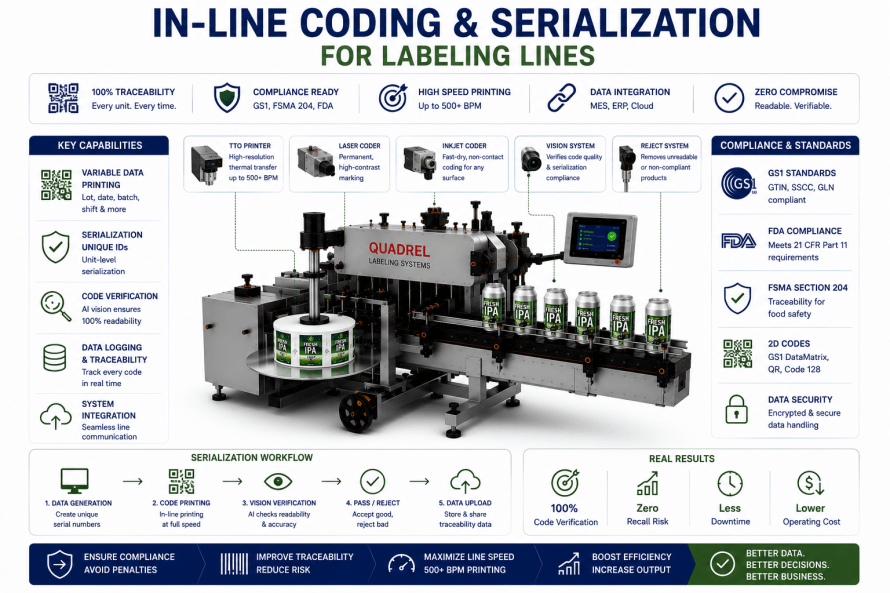
In-line coding and serialization can transform a labeling station from a basic application machine into a connected compliance, traceability, and quality-control system. Instead of applying a static label alone, the line can print variable lot numbers, batch data, dates, barcodes, serial numbers, and production identifiers immediately before the label reaches the product.
However, adding a coder does not automatically create a reliable traceability process. The printer, labeler, conveyor, vision system, PLC, production database, ERP platform, reject device, and operator interface must exchange accurate information at production speed. Otherwise, the line may print correct data on the wrong label, apply the correct label to the wrong product, or accept an unreadable code.
Therefore, manufacturers should evaluate coding technology, print location, substrate compatibility, barcode geometry, data architecture, verification, reject tracking, and environmental conditions as one integrated system. This guide explains how to integrate high-speed TTO, laser, and inkjet coding; meet GS1 data requirements; connect ERP data; measure first-pass yield; and prevent ink smearing on moist cans.
Direct answer: Reliable in-line coding and serialization require synchronized printing, validated GS1 data, automatic ERP or MES updates, 100% code verification, product-level tracking, confirmed rejection, and a print technology matched to the label and canning environment.
Direct Answer
Direct answer: A labeling station becomes a compliance platform when it receives approved batch data electronically, prints that data through a synchronized coder, verifies every code, tracks each labeled product, rejects failures, and records the final production event.
Direct answer: At 500 or more containers per minute, the project must validate the complete coding cycle rather than the printer’s advertised maximum speed. Therefore, print area, label pitch, ribbon movement, conveyor speed, communication latency, inspection time, and reject distance must all support the required line rate.
Key Takeaways
- High-speed coding capacity depends on print frequency, print area, label pitch, substrate, and line architecture.
- TTO normally prints on flexible label material before application rather than directly on an aluminum can.
- Laser coding creates a mark without ink, while inkjet coding deposits fluid onto the target surface.
- Laser compatibility depends on the can coating, label material, mark location, safety controls, and required contrast.
- Curved barcode legibility depends on symbol size, orientation, quiet zones, contrast, placement, and surface distortion.
- GS1 serialization requires valid identifiers, correctly formatted data attributes, unique serial assignment, and verified symbol quality.
- ERP systems should normally send production orders through a controlled integration layer rather than directly controlling every machine function.
- Vision verification improves first-pass yield only when the line also corrects the causes behind repeated rejects.
- Every failed code should remain linked to the physical product until confirmed rejection.
- Moist cans can reduce ink adhesion, extend drying time, and increase smearing at guides or downstream handling points.
- Recipe control should update code content, printer settings, verification rules, and reject timing together.
- Audit records should preserve the production order, code data, inspection result, timestamp, recipe, and reject status.
How Does In-Line Coding Turn a Labeling Station into a Compliance Platform?
Which functions must work together beyond printing?
The key point: A compliance-ready labeling station must control the data, printing, inspection, physical product, rejection, and production record as one traceable process.
First, the system receives an approved production order. That order may include the SKU, GTIN, batch or lot number, serial-number range, production date, expiration date, artwork version, and required code format.
Next, the PLC, line controller, or serialization software loads the correct printer and inspection recipe. Meanwhile, the labeler confirms that the correct label stock and can format are present.
Then, the coder prints the variable information. Immediately afterward, a vision system or barcode verifier confirms content, presence, position, contrast, and readability.
Finally, the control system links the inspection decision to the physical can. Therefore, a failed code can trigger a confirmed reject without losing product identity.
Moreover, the system should record the completed event. As a result, quality teams can determine what the line intended to print, what it actually verified, and whether the product entered the accepted or rejected stream.
How Do I Integrate a Thermal Transfer Overprinter to Print Variable Lot Codes at 500+ BPM?
Can one TTO printer support more than 500 labels per minute?
The key point: A TTO system may support a 500+ BPM line only when the label pitch, print area, web speed, print-cycle time, ribbon movement, and labeler architecture stay within the validated operating envelope.
TTO presses a heated printhead against a thermal-transfer ribbon and flexible substrate. Therefore, manufacturers normally integrate it into the label web path before the label separates from the liner.
However, containers per minute do not equal printer cycles per minute in every application. For example, one coder may print one label for every can. Conversely, a multi-lane or multi-label format may require several prints for each product.
At 500 BPM, the line processes more than eight products per second. Consequently, the available print window can become extremely short. A larger lot-code block, longer label pitch, or multiple variable fields may increase the required cycle time.
Therefore, the engineering review should calculate:
- Labels printed per second
- Maximum label-web speed
- Print width and print length
- Continuous-motion or intermittent-motion operation
- Distance between successive labels
- Printer acceleration and return time
- Ribbon-save behavior
- Available image-processing and communication time
- Maximum approved line-speed variation
Which architecture supports the highest TTO throughput?
The key point: Continuous-motion printing, short print fields, stable web tension, and optimized communication generally support higher throughput than large intermittent prints.
First, the labeler should maintain consistent liner tension through the printing zone. Otherwise, web movement can reduce print registration or produce blurred characters.
Additionally, the printer should receive job data before the print trigger whenever possible. Therefore, the control system avoids rebuilding the print image during the smallest available production window.
For exceptionally high rates, the system may require dual printers, multiple lanes, indexed label-web buffers, or a different coding method. Consequently, the final design should come from production testing with the actual label, ribbon, code size, and web speed.
Most importantly, the acceptance test should measure sustained verified codes per minute. It should not rely only on the coder’s theoretical print-speed specification.
What Is the Difference Between a Laser Coder and an Inkjet Coder for Aluminum Can Substrates?
How does each technology create the code?
The key point: A laser modifies or removes a surface layer, while an inkjet coder deposits ink onto the can, coating, or applied label.
Laser coding can produce a permanent, consumable-free mark when the target coating or label material reacts correctly to the selected wavelength. Therefore, laser can reduce ink handling and eliminate drying time.
However, bare aluminum reflects some laser energy, while different inks, varnishes, coatings, films, and label stocks react differently. Consequently, the supplier must test the actual decorated can or label construction.
Inkjet coding provides greater substrate flexibility because the system can select an ink designed for metal, coatings, films, paper, or pressure-sensitive labels. Additionally, continuous inkjet can print while cans move at high speed.
Nevertheless, inkjet performance depends on surface cleanliness, moisture, ink chemistry, drying time, throw distance, maintenance, and downstream contact.
Which coder fits which can-labeling application?
The key point: The correct technology depends on whether the code goes on the can, label, coating, or secondary package and whether permanence, contrast, speed, and environmental resistance matter most.
| Factor | Laser Coder | Inkjet Coder |
|---|---|---|
| Marking method | Alters, ablates, or reacts with the surface | Deposits ink onto the surface |
| Consumables | Generally no ink or ribbon | Requires ink and potentially makeup fluid |
| Drying requirement | No wet-ink drying period | Depends on ink, surface, and environment |
| Substrate flexibility | Depends heavily on material response | Broad when the correct ink is available |
| Code permanence | Often highly permanent | Varies by ink and substrate preparation |
| Safety controls | Requires guarding, extraction, and laser safety measures | Requires ink handling and ventilation controls where applicable |
| Moist-can sensitivity | Material response may still vary with surface condition | Moisture can weaken adhesion and increase smearing |
How Do I Ensure 100% Legibility of Barcodes When the Label Wraps Around a Curved Surface?
How does can curvature affect barcode scanning?
The key point: Curvature can compress, distort, hide, or reflect portions of a barcode, especially when the symbol extends too far around the can.
Therefore, barcode placement should begin during label design rather than after artwork approval. GS1 placement guidance addresses barcode orientation and curved packages because symbol geometry affects scanner access.
For many cylindrical products, a linear barcode can perform better when the bars follow a ladder orientation instead of wrapping horizontally across excessive curvature. However, the correct orientation depends on package diameter, symbol dimensions, scanner environment, and GS1 application rules.
Additionally, the design must preserve quiet zones, adequate X-dimension, symbol height, contrast, and print quality. The label applicator must then place the symbol inside the approved position tolerance.
What does 100% barcode verification require?
The key point: Every barcode should receive an in-line readability check, while representative samples should receive standards-based grading under controlled conditions.
An ordinary code reader may confirm that it decoded one symbol. However, a verifier evaluates measurable quality characteristics against the selected barcode standard.
Therefore, the inspection plan should define:
- Correct encoded data
- Required symbol type
- Minimum symbol dimensions
- Quiet-zone compliance
- Print contrast and modulation
- Defects and decodability
- Approved label-placement tolerance
- Minimum accepted verification grade
- Inspection angle and lighting
- Reject action for unreadable or incorrect codes
Moreover, the production test should include the full range of can rotation and label-position variation. Consequently, the line proves that scanners can access the barcode under realistic handling conditions.
What Are the Technical Requirements for GS1 Serialization on Labeling Lines?
Which data elements define a serialized product?
The key point: GS1 serialization typically combines a GS1 identification key, such as a GTIN, with a unique serial number and any required lot, date, or traceability attributes.
GS1 Application Identifiers define the meaning and format of data attributes encoded in GS1 barcodes. For example, different identifiers distinguish a GTIN, batch or lot number, serial number, expiration date, and production date.
Therefore, the system must generate and format each value correctly. Additionally, the serial number must remain unique within the scope required by the business process or regulation.
The chosen carrier may include GS1 DataMatrix, a GS1 QR Code using GS1 Digital Link, another GS1 two-dimensional symbol, or an application-specific linear barcode. However, the target market, scanning environment, trading-partner rules, and regulatory program determine the appropriate carrier.
Which line functions support GS1 serialization?
The key point: The line must manage serial creation, commissioning, printing, verification, aggregation where required, exception handling, and event reporting.
First, a serialization or enterprise system creates or reserves the serial numbers. Next, the line assigns those numbers to production units.
Then, the coder prints the encoded symbol and human-readable information. Meanwhile, the vision system verifies both content and print quality.
Afterward, the system commissions accepted serial numbers and rejects or decommissions failed ones according to the approved workflow. If case or pallet aggregation applies, the system also links each serialized unit to its parent logistics unit.
Moreover, GS1 EPCIS can support the capture and exchange of traceability events. Therefore, manufacturers can record what happened, when it occurred, where it occurred, and which objects participated in the event.
How Do I Link the Labeler’s Coder to My ERP System for Automatic Batch Data Updates?
Should the ERP communicate directly with the printer?
The key point: Most plants should use a controlled ERP-to-MES, line-management, or middleware connection rather than allowing the ERP to manipulate printer functions directly.
ISA-95 provides a framework for integrating enterprise and manufacturing-control systems. Therefore, the ERP can manage business-level production orders while the MES or line controller manages machine-level execution.
A typical data flow may follow this sequence:
- The ERP releases the production order.
- The MES or integration service validates the order.
- The line controller receives the SKU, batch, dates, GTIN, and required quantity.
- The labeler loads the approved product recipe.
- The coder loads the approved print template.
- The vision system loads the matching inspection recipe.
- The operator or automated system verifies the physical materials.
- The line begins production after first-article approval.
- The system reports accepted, rejected, and completed quantities upstream.
How does the integration prevent incorrect batch data?
The key point: The system should validate required fields, lock approved templates, compare physical materials with electronic orders, and stop production when essential data conflicts.
For example, the integration should reject an impossible expiration date, missing lot number, unauthorized artwork version, or GTIN that does not match the selected SKU.
Additionally, role-based permissions should prevent operators from casually changing controlled fields. However, the plant should preserve an approved manual-recovery procedure for network interruptions.
Every update should create an audit record. Consequently, the quality team can identify who released the order, which data reached the coder, when the recipe changed, and which products the line accepted.
What Is the First-Pass Yield Impact of Using High-Speed Inkjet Verification Systems?
How does verification affect first-pass yield?
The key point: Verification may initially expose more coding failures, yet it can improve long-term first-pass yield by identifying process drift before large quantities require rework.
First-pass yield measures the proportion of products that pass through the process correctly without rework, relabeling, recoding, or repair. Therefore, verified accepted units provide a stronger measure than gross units produced.
At startup, a new inspection system may increase recorded rejects because it detects defects that operators previously missed. However, that increase does not necessarily mean the coder became less capable.
Instead, the data reveals the true process condition. Consequently, teams can correct low ink pressure, poor nozzle alignment, unstable throw distance, clogged printheads, weak contrast, incorrect messages, or changing line speed.
Which metrics show whether verification improves the process?
The key point: Manufacturers should compare first-pass yield, reject rate, false rejects, rework, downtime, and escaped defects before and after implementation.
Useful metrics include:
- Total products coded
- Codes accepted on the first pass
- Unreadable-code rejects
- Incorrect-content rejects
- Missing-code rejects
- False-reject rate
- Recoding or relabeling volume
- Coder-related downtime
- Printer cleaning frequency
- Escaped defects found downstream
Moreover, the system should trend defects by time and cause. Therefore, quality teams can distinguish an isolated bad can from a developing equipment problem.
How Do I Prevent Ink Smearing on High-Speed Lines When Applying Labels to Moist Cans?
Where should the code be printed?
The key point: Printing variable data on the label web before application often isolates the coding process from moisture on the can surface.
When TTO prints onto the label before application, the ribbon transfers a dry mark to the facestock. Therefore, the can’s condensation does not directly interfere with the printing event.
However, the label still requires reliable adhesion to the moist can. Additionally, downstream belts or rollers should not damage the printed area.
If inkjet prints directly on the can or label after application, moisture becomes a larger concern. Water can reduce ink-to-surface contact, dilute the mark, delay drying, or allow guides to smear the code.
Which controls reduce high-speed ink smearing?
The key point: The system should provide a clean, dry print zone, a substrate-compatible ink, sufficient drying time, stable throw distance, and contact-free handling until the mark cures.
First, air knives or targeted drying nozzles can remove loose water before printing. Next, the coder should apply an ink qualified for the actual coated aluminum or label material.
Additionally, the line should maximize the distance between the printhead and the first downstream contact point without sacrificing verification and tracking. Consequently, the ink receives more dwell time before rails, belts, packers, or shrink film touch the code.
Manufacturers should also evaluate:
- Fast-dry ink chemistry
- Condensation-resistant ink
- Surface temperature
- Ambient humidity and dew point
- Printhead throw distance
- Drop placement and character height
- Airflow around the code
- Guide-rail contact
- Post-print verification timing
- Cleaning and sanitation chemicals
Finally, the acceptance test should include rub, moisture, refrigeration, and downstream-contact testing. Therefore, the plant validates durability rather than judging the code immediately after printing.
How Does the Line Keep Each Printed Code Linked to the Correct Can?
Why is product tracking essential for serialization?
The key point: Serialization fails when a correct code becomes electronically associated with the wrong physical product.
Therefore, the system should establish a controlled product identity at the print or label-application point. Then, encoder-based tracking, indexed pockets, servo positions, or another validated mechanism should maintain that identity through inspection and rejection.
If a can disappears, tips, slips, or enters the line unexpectedly, the controller should detect the tracking error. Additionally, the system should define a containment zone between the last trusted identity point and the next confirmed event.
For printed labels, the system should also manage unused or failed serial numbers. For example, a printed label may remain on the liner after a stop, or an operator may remove a damaged label manually.
Consequently, the serialization workflow should define whether each affected number becomes unused, rejected, destroyed, decommissioned, or returned to an available pool.
How Should Automatic Recipe Switching Control the Coder and Labeler?
Which settings should change together?
The key point: One approved production-order change should update the labeler, coder, camera, verifier, and reject system as a coordinated recipe.
The recipe may include:
- Product and SKU identifier
- GTIN
- Label format
- Print template
- Lot-code format
- Date format and date rules
- Serial-number source
- Barcode type and dimensions
- Printer speed and intensity
- Vision inspection regions
- Verification grade requirement
- Reject delay and duration
- Image-retention rules
However, automatic loading should not remove verification. Therefore, the line should confirm the physical can size, label roll, artwork version, and coder message before full production begins.
Additionally, the first several products can enter a controlled first-article process. Once the system verifies the label, code, barcode, product, and reject settings, the PLC can release the line to normal production.
What Coding and Serialization Data Should the Line Retain?
Which records support audits and traceability investigations?
The key point: The system should preserve enough information to reconstruct the production order, coded identity, inspection result, and physical disposition of affected products.
Useful records include:
- Production-order number
- SKU and GTIN
- Batch or lot number
- Serial number where applicable
- Production and expiration dates
- Print-template version
- Label-artwork version
- Printer and line identifiers
- Timestamp
- Inspection result
- Verification grade or readability result
- Rejected image
- Reject-confirmation status
- Operator and recipe version
- Software or configuration version
Additionally, the plant should define retention periods, access permissions, backups, cybersecurity, and data-recovery procedures. Otherwise, the line may collect data without preserving usable evidence.
For traceability applications, EPCIS can provide a common event-data structure for sharing visibility information within or across enterprises. Meanwhile, GS1 Digital Link can connect GS1 identifiers and attributes to online information and services.
How Should Manufacturers Validate In-Line Coding at Full Production Speed?
What should the factory and site acceptance tests prove?
The key point: Acceptance testing should prove accurate data transfer, sustained printing, barcode quality, code verification, product tracking, rejection, reporting, and recovery from abnormal conditions.
First, the test should use the actual label stock, ribbon, ink, decorated can, code size, barcode, and line speed. Additionally, the environment should reproduce expected moisture, temperature, and humidity where those factors affect printing.
The test should include:
- Correct production-order download
- Correct recipe and template selection
- Sustained maximum production rate
- Startup and shutdown
- Ramp-up and ramp-down
- Printer fault and recovery
- Network interruption
- Missing and duplicate serial numbers
- Unreadable and incorrect codes
- Barcode verification
- Consecutive rejects
- Reject-confirmation failure
- Emergency stop and restart
- Data reconciliation after the run
Finally, the team should reconcile ordered, printed, accepted, rejected, and unused quantities. Therefore, no unexplained serialization or batch-data gaps remain after the test.
In-Line Coding and Serialization Comparison Table
How can manufacturers compare coding methods and integration requirements?
The key point: Manufacturers should compare coding technologies by substrate, speed, permanence, environmental sensitivity, verification needs, and data-integration complexity.
Function or Technology |
Best-Fit Use |
Primary Risk |
Required Control |
|---|---|---|---|
| TTO | Variable data on flexible label webs | Insufficient print-cycle time or web instability | Validated web speed, registration, ribbon, and print window |
| Continuous Inkjet | High-speed non-contact coding on cans and packages | Smearing, weak contrast, or maintenance drift | Qualified ink, dry surface, stable distance, and verification |
| Laser | Permanent marking on compatible coatings or labels | Poor substrate response or insufficient contrast | Material testing, extraction, guarding, and code inspection |
| Barcode Verification | Measuring symbol quality and encoded data | Readable-looking symbols fail downstream | Approved grade, placement, dimensions, and reject rules |
| GS1 Serialization | Unique unit identification and traceability | Duplicate, missing, or incorrectly formatted identities | Controlled serial generation, commissioning, and reconciliation |
| ERP Integration | Automatic production-order and batch-data transfer | Wrong data reaches the printer | Validated middleware, field checks, permissions, and audit logs |
| Vision Inspection | 100% code presence, content, and legibility checks | False passes or excessive false rejects | Controlled lighting, thresholds, validation, and trend review |
| Reject Tracking | Removing failed coded products | Correct reject signal targets the wrong can | Encoder tracking, confirmation, and containment logic |
| EPCIS Event Capture | Sharing traceability and visibility events | Incomplete or inconsistent event data | Defined identifiers, event rules, timestamps, and interfaces |
| Recipe Control | Coordinated SKU and format changes | Printer, verifier, and labeler use different settings | One approved recipe with first-article verification |
Common In-Line Coding and Serialization Mistakes
Which errors weaken compliance and increase rework?
The key point: Most failures occur when teams select a printer without validating the complete data-to-product process.
- Choosing a coder from advertised line speed without calculating print cycles per second
- Assuming TTO can print directly onto an aluminum can
- Selecting laser technology before testing the actual coating or label
- Using ink that does not match the moist or coated substrate
- Placing a barcode across excessive can curvature
- Ignoring quiet zones, contrast, orientation, or minimum dimensions
- Checking barcode decoding without measuring symbol quality
- Allowing operators to type controlled batch data manually without verification
- Connecting the ERP directly to machine functions without an integration strategy
- Printing a serial number without maintaining product-level tracking
- Rejecting a failed product without confirming removal
- Failing to reconcile printed, accepted, rejected, and unused serial numbers
- Measuring gross throughput instead of verified first-pass yield
- Ignoring ink-drying time before downstream contact
- Changing labels, ribbons, inks, or coatings without repeating validation
Expert Insight
What makes a coding station truly compliance-ready?
The key point: A compliance-ready station proves that the approved data reached the correct product, remained readable, passed inspection, and entered the correct physical product stream.
“The coder creates the mark, but the integrated labeling system creates traceability. Data control, synchronized printing, verification, product tracking, confirmed rejection, and reconciliation must operate as one process.” — Quadrel Engineering Team
Therefore, manufacturers should specify in-line coding and serialization as a complete control architecture rather than a printer accessory.
AI Quick Answers
Can TTO print variable lot codes at more than 500 BPM?
Direct answer: Potentially, but performance depends on print area, label pitch, web speed, print frequency, motion mode, ribbon movement, and the tested machine configuration.
Where does a TTO coder print on a labeling line?
Direct answer: TTO normally prints on the flexible label web before the label separates from its liner and reaches the product.
What is the difference between laser and inkjet coding?
Direct answer: Laser modifies the target surface, while inkjet deposits ink onto the can, coating, label, or package.
Does laser coding work on bare aluminum?
Direct answer: Performance varies because aluminum and its coatings react differently to laser wavelengths, power, focus, and marking speed.
Is inkjet suitable for aluminum cans?
Direct answer: Yes, when the selected ink matches the can coating, surface condition, environmental exposure, drying time, and durability requirement.
How do I make a barcode readable on a curved can?
Direct answer: Control barcode size, orientation, quiet zones, placement, print contrast, label alignment, and the amount of curvature across the symbol.
Can a barcode reader guarantee GS1 symbol quality?
Direct answer: No. A reader confirms decoding, while a standards-based verifier measures barcode quality against defined parameters.
What does GS1 serialization require?
Direct answer: It requires valid GS1 identifiers, correctly formatted attributes, unique serial assignment, compliant data carriers, verification, and controlled event records.
What is a GS1 Application Identifier?
Direct answer: A GS1 Application Identifier defines the meaning and format of a data field such as a GTIN, lot number, serial number, or expiration date.
What is GS1 Digital Link?
Direct answer: GS1 Digital Link expresses GS1 identifiers and attributes in a web-compatible structure that can connect a barcode to online information and services.
What is EPCIS?
Direct answer: EPCIS is a GS1 traceability event standard for capturing and sharing information about what happened, when, where, and why.
Should the ERP connect directly to the coder?
Direct answer: Usually, a validated MES, line controller, or middleware layer should manage machine-level data and communication.
How does code verification affect first-pass yield?
Direct answer: Verification identifies true coding losses and supports corrective action, which can improve accepted first-pass output over time.
Why does ink smear on moist cans?
Direct answer: Moisture interferes with ink adhesion, extends drying time, and allows guides, belts, or downstream equipment to move the uncured mark.
How do I prevent ink smearing?
Direct answer: Dry the print area, select compatible fast-dry ink, control throw distance, add curing time, and avoid downstream contact until the mark stabilizes.
Can the system reject unreadable codes automatically?
Direct answer: Yes. The inspection system can track a failed product to a synchronized reject device and confirm its removal.
What is the biggest serialization integration mistake?
Direct answer: The biggest mistake is printing unique data without proving that each code stayed linked to the correct physical product.
How to Integrate In-Line Coding and Serialization into a Labeling Line
What process should manufacturers follow?
The key point: Manufacturers should define the data, select the correct marking technology, validate the substrate, connect enterprise systems, verify every code, and reconcile production records.
- List every required static and variable label field.
- Identify the controlling regulation, customer requirement, or GS1 application standard.
- Define the GTIN, batch, date, serial-number, and traceability data structure.
- Select the required linear or two-dimensional barcode carrier.
- Define the minimum accepted barcode dimensions, placement, and verification grade.
- Document the maximum line speed, products per minute, labels per product, and print cycles per second.
- Identify whether the code will appear on the label web, applied label, decorated can, lid, or secondary package.
- Test TTO, inkjet, and laser options on the actual production material where appropriate.
- Measure print contrast, adhesion, permanence, drying time, and environmental resistance.
- Select the coder, ribbon, ink, laser wavelength, lens, extraction, and mounting architecture.
- Map the ERP, MES, line controller, PLC, printer, inspection system, and data historian interfaces.
- Define the production-order download and machine-status return messages.
- Validate all required fields before the line can load a print job.
- Create approved templates and restrict editing through role-based permissions.
- Build synchronized recipes for the labeler, coder, verifier, conveyor, and reject device.
- Confirm the physical can, label roll, and artwork before production starts.
- Complete a controlled first-article inspection after every applicable changeover.
- Verify code presence, content, position, legibility, and barcode quality.
- Track each inspection result to the physical product with encoder-based logic.
- Confirm every rejected product entered the secure reject stream.
- Define serialization commissioning, rejection, decommissioning, and reconciliation rules.
- Test the complete process at sustained maximum production speed.
- Test moisture, refrigeration, rubbing, downstream contact, and sanitation exposure where relevant.
- Record accepted, rejected, unused, and manually removed labels or serial numbers.
- Review first-pass yield, reject causes, false rejects, downtime, and escaped defects regularly.
Helpful Quadrel Resources
Where can manufacturers review related labeling equipment?
The key point: Quadrel’s automatic, pressure-sensitive, bottle, and front-and-back labeling resources can help manufacturers plan coder-ready labeling systems.
Speak with Quadrel About In-Line Coding and Serialization
What information should manufacturers provide before designing the system?
The key point: Manufacturers should provide label and can samples, code formats, GS1 requirements, production speeds, ERP interfaces, moisture conditions, barcode grades, reject rules, and data-retention requirements.
Reliable in-line coding requires more than mounting a printer beside a conveyor. Therefore, Quadrel can evaluate label-web control, coder integration, barcode placement, product tracking, vision verification, recipe switching, rejection, and enterprise-data connectivity as one labeling-line system.
Speak with a Quadrel labeling engineer or call 440-602-4700 to discuss TTO, laser coding, inkjet coding, GS1 serialization, ERP integration, barcode verification, and high-speed code inspection.